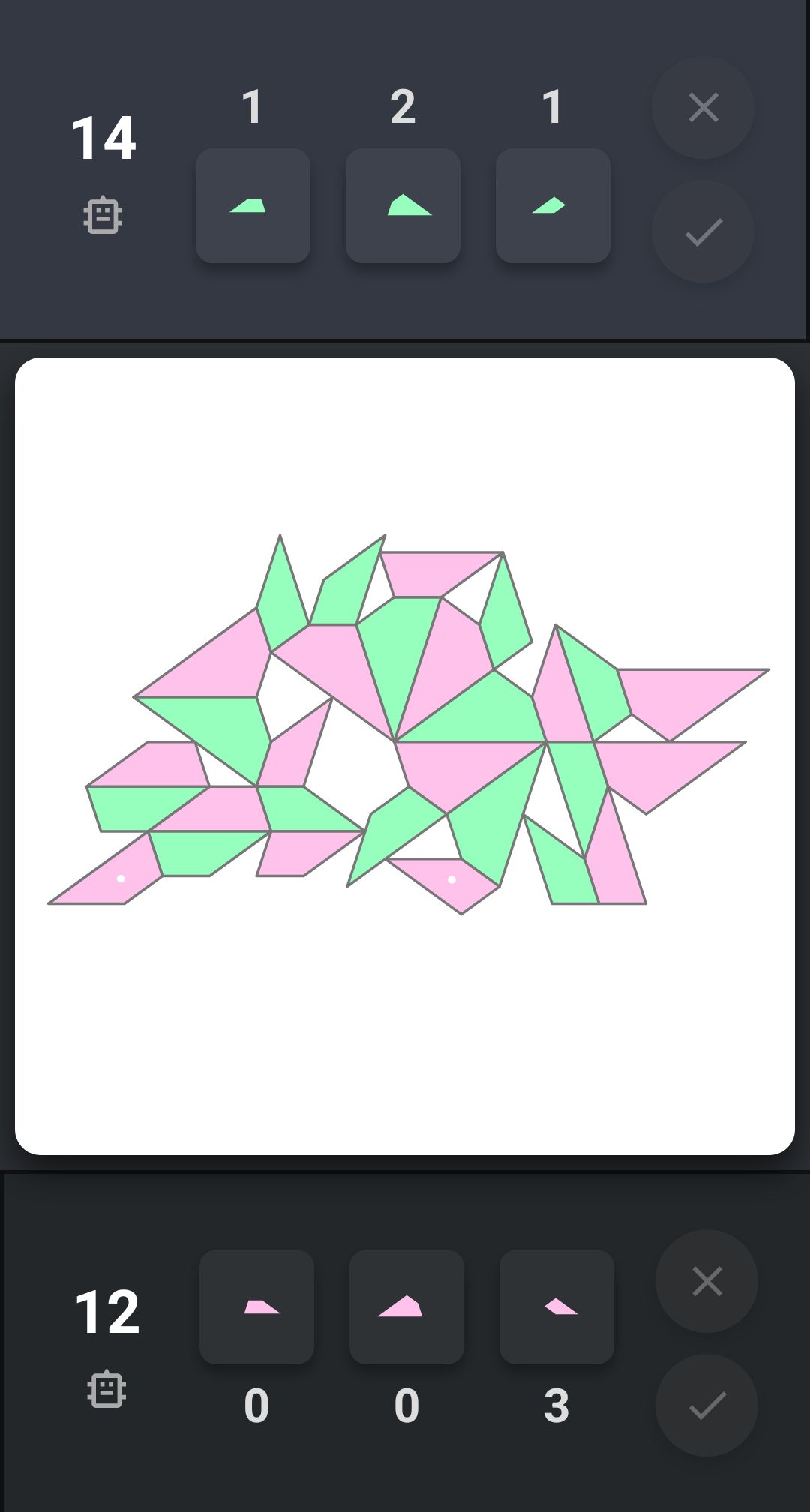
計分出錯,紅應該有十四分:
代码: 全选
修復和改進
一,計分出錯

如圖所示,先手方應該是14分,但現在誤計為12分。在白點所標記的棋子落下之前,先手方就已經有12分,現在加上白點棋子所形成的頂鑫結構有2,總共應是14分。檢查代碼並修復。

二,棋子顯示變大

在控制區中的棋子應放大到幾乎碰到外框,不需改變外框的大小。

三,增加工具欄以及增加頂鑫環

在棋盤的下方中間增加工具欄,其圖標都是svg,有「回退、前進、提示」。

其中「提示」的用法是,當點擊時將顯示所有頂鑫環,再次點擊則隱藏。

頂鑫環是指,當形成一個頂鑫結構時,將在棋盤svg中的g.etdrop增加一個path,其路徑d從鑫棋開始,以每一個棋子的中心為路徑坐標,直至頂棋。fill為none,連接處和頭尾都要是round,stroke-width為3,stroke如果是先手方得分則為深紅色,如果是後手方拿分則為深綠色。

回答要求:請明確給出所要修改的地方和所要替換的代碼。
gemini 3.1 pro + thinking
代码: 全选
這三個問題中,**計分出錯**的原因在於原代碼使用 `scoredVictims`(已計分鑫棋)來記錄。一旦某個棋子在先前的回合被當作鑫棋計分過,當它在後續回合被另一個**距離更近**的棋子頂到時,代碼會因為它「已經計分過」而忽略它,這違反了規則 3(取最近的頂棋來計分)。
最好的修復方式是**廢除 `scoredVictims**`,並在每次按下確認(Check)時,**根據當前盤面重新計算所有分數**。這不僅解決了計分漏洞,也完美契合了「撤銷/重做」的功能需求。

以下是完整的修改與替換步驟:

### 第一部分:修改 CSS (放大棋子並新增工具欄樣式)

請在 `<style>` 區塊中,找到 `.tile-box svg` 及 `@media` 手機佈局的部份,替換並在下方加入工具欄的樣式:

**替換這段代碼:**

```css
      .tile-box svg {
        width: 45px;
        height: 45px;
        overflow: visible;
      }
      .tile-count {

```

**替換為:**

```css
      .tile-box svg {
        width: 58px;
        height: 58px;
        overflow: visible;
      }
      .tile-count {

```

**找到 `@media (max-width: 768px)` 裡面的這段並替換:**

```css
        .tile-box svg {
          width: 36px;
          height: 36px;
        }

```

**替換為:**

```css
        .tile-box svg {
          width: 48px;
          height: 48px;
        }

```

**在 `<style>` 的最底部(`</style>` 之前)加入工具欄樣式:**

```css
      /* Toolbar */
      .toolbar {
        position: absolute;
        bottom: 20px;
        left: 50%;
        transform: translateX(-50%);
        display: flex;
        gap: 20px;
        background: rgba(35, 39, 42, 0.95);
        padding: 10px 20px;
        border-radius: 30px;
        box-shadow: 0 4px 10px rgba(0, 0, 0, 0.6);
        z-index: 100;
      }
      .tool-btn {
        width: 40px;
        height: 40px;
        border-radius: 50%;
        background: #444;
        display: flex;
        align-items: center;
        justify-content: center;
        cursor: pointer;
        transition: 0.2s;
      }
      .tool-btn svg {
        width: 24px;
        height: 24px;
        fill: white;
      }
      .tool-btn:hover:not(.disabled) {
        background: #5b6eae;
      }
      .tool-btn.active {
        background: #f1c40f;
      }
      .tool-btn.active svg {
        fill: #23272a;
      }
      .tool-btn.disabled {
        opacity: 0.3;
        cursor: not-allowed;
      }

```

---

### 第二部分:修改 HTML (調整 viewBox 讓棋子佔滿外框,並加入工具欄)

**1. 修改控制區的棋子 `viewBox`:**
請搜尋 HTML 中所有的 `viewBox="-100 -100 200 200"`(總共有 6 個,分別在 `#box-tile0` 到 `#box-tile5` 裡面),將它們**全部替換為**:
`viewBox="-85 -85 170 170"`

**2. 加入工具欄 DOM:**
找到 `<div class="board-container">` 這個區塊,在 `<svg id="etanitrigolden" ...> ... </svg>` 的**正下方**(但在 `</div>` 結束標籤之前)插入以下代碼:

```html
      <div class="toolbar">
        <div class="tool-btn disabled" id="btn-undo" onclick="undoTurn()">
          <svg viewBox="0 0 24 24"><path d="M12.5 8c-2.65 0-5.05.99-6.9 2.6L2 7v9h9l-3.62-3.62c1.39-1.16 3.16-1.88 5.12-1.88 3.54 0 6.55 2.31 7.6 5.5l2.37-.78C20.48 10.82 16.89 8 12.5 8z"/></svg>
        </div>
        <div class="tool-btn" id="btn-hint" onclick="toggleHint()">
          <svg viewBox="0 0 24 24"><path d="M9 21c0 .55.45 1 1 1h4c.55 0 1-.45 1-1v-1H9v1zm3-19C8.14 2 5 5.14 5 9c0 2.38 1.19 4.47 2.96 5.71C8.6 15.15 9 15.82 9 16.5V18c0 .55.45 1 1 1h4c.55 0 1-.45 1-1v-1.5c0-.68.4-1.35 1.04-1.79C16.81 13.47 18 11.38 18 9c0-3.86-3.14-7-7-7z"/></svg>
        </div>
        <div class="tool-btn disabled" id="btn-redo" onclick="redoTurn()">
          <svg viewBox="0 0 24 24"><path d="M11.5 8C7.11 8 3.52 10.82 2.03 14.22l2.37.78C5.45 11.81 8.46 9.5 12 9.5c1.96 0 3.73.72 5.12 1.88L13.5 15H22.5V6l-3.6 3.6C17.05 8.99 14.65 8 11.5 8z"/></svg>
        </div>
      </div>

```

---

### 第三部分:修改 JavaScript (計分重構、繪製頂鑫環、歷史紀錄)

**1. 刪除並新增全局變數:**
找到 `let scores = { 1: 0, 2: 0 };` 附近,**刪除** `let scoredVictims = new Set();`,並加入歷史紀錄的變數:

```javascript
      let scores = { 1: 0, 2: 0 };
      // 刪除 scoredVictims = new Set();
      let aiEnabled = { 1: false, 2: false };
      // ...
      let lastTurnPieces = [];

      // 新增以下歷史紀錄與提示變數
      let gameHistory = [];
      let currentHistoryIndex = -1;
      let showHint = false;

```

**2. 替換 `getGraphDistance` 函數並新增 `recalculateScoresAndPaths`:**
找到原本的 `getGraphDistance` 函數,**將整個函數替換為以下代碼**(這會讓它順便返回路徑坐標,並抽離出全局算分的邏輯):

```javascript
      function getGraphDistance(start, end, allP) {
        let q = [{ node: start, path: [start] }];
        let visited = new Set([start.id]);
        while (q.length > 0) {
          let curr = q.shift();
          if (curr.node.id === end.id) return { dist: curr.path.length - 2, path: curr.path };
          for (let next of allP) {
            if (!visited.has(next.id)) {
              let connected = false;
              for (let i = 0; i < 4; i++)
                for (let j = 0; j < 4; j++) {
                  if (
                    segmentsPerfectlyMatch(
                      curr.node.vertices[i],
                      curr.node.vertices[(i + 1) % 4],
                      next.vertices[j],
                      next.vertices[(j + 1) % 4]
                    )
                  )
                    connected = true;
                }
              if (connected) {
                visited.add(next.id);
                q.push({ node: next, path: [...curr.path, next] });
              }
            }
          }
        }
        return { dist: -1, path: [] }; // -1 代表不通
      }

      function recalculateScoresAndPaths(boardPieces) {
        let newScores = { 1: 0, 2: 0 };
        let paths = [];
        let dingMap = new Map();

        for (let A of boardPieces) {
          for (let B of boardPieces) {
            if (A.id === B.id) continue;
            let isDing = false;
            for (let v of A.vertices) {
              for (let e = 0; e < 4; e++) {
                if (pointOnOpenSegment(v, B.vertices[e], B.vertices[(e + 1) % 4])) {
                  isDing = true; break;
                }
              }
              if (isDing) break;
            }

            if (isDing) {
              let res = getGraphDistance(B, A, boardPieces);
              if (res.dist > 0) {
                if (!dingMap.has(B.id)) dingMap.set(B.id, []);
                dingMap.get(B.id).push({ dinger: A, dist: res.dist, path: res.path });
              }
            }
          }
        }

        dingMap.forEach((dings, bId) => {
          let minDist = Infinity;
          let bestDing = null;
          for (let ding of dings) {
            if (ding.dist < minDist) {
              minDist = ding.dist;
              bestDing = ding;
            }
          }
          if (bestDing) {
            let victimPiece = boardPieces.find(x => x.id === bId);
            let scorer = null;
            if (SCORING_MODE === 0) scorer = bestDing.dinger.owner;
            else if (SCORING_MODE === 1) scorer = victimPiece.owner;
            else if (SCORING_MODE === 2) {
              if (bestDing.dinger.owner === victimPiece.owner) scorer = bestDing.dinger.owner;
            }

            if (scorer) {
              newScores[scorer] += minDist;
              paths.push({ path: bestDing.path, scorer: scorer });
            }
          }
        });
        return { scores: newScores, paths: paths };
      }

```

**3. 重構 `actionCheck` (計分邏輯):**
找到 `actionCheck(that = false)` 函數,將其**整個函數替換**為以下極簡且精確的邏輯:

```javascript
      function actionCheck(that = false) {
        if (that && that.classList.contains('disabled')) return;

        let allNewP = pieces.concat(tempPieces);
        let result = recalculateScoresAndPaths(allNewP);
        scores = result.scores;

        pieces = allNewP;
        lastTurnPieces = [...tempPieces];
        tempPieces = [];
        selectedTile = null;
        targetOpponentPieceId = null;
        ghosts = [];

        turnNumber++;
        currentPlayer = currentPlayer === 1 ? 2 : 1;

        saveState(); // 這裡面包含了 updateUI() 和 renderBoard()
        checkEndGame();

        if (aiEnabled[currentPlayer]) {
          setTimeout(playAI, 500);
        }
      }

```

**4. 在 `renderBoard` 中渲染頂鑫環:**
找到 `renderBoard()` 函數,在它的**最後面**(也就是 `} else if (!selectedTile && !targetOpponentPieceId) { ... }` 這個區塊之後),加入這段代碼:

```javascript
        // 繪製頂鑫環 (Hint)
        if (showHint) {
          let allP = pieces.concat(tempPieces);
          let res = recalculateScoresAndPaths(allP);
          res.paths.forEach(pData => {
            let d = "";
            pData.path.forEach((pc, idx) => {
              let cxExact = [
                pc.vertices.reduce((s, v) => s + v[0], 0) / 4,
                pc.vertices.reduce((s, v) => s + v[1], 0) / 4,
                pc.vertices.reduce((s, v) => s + v[2], 0) / 4,
                pc.vertices.reduce((s, v) => s + v[3], 0) / 4
              ];
              let scr = exactToScreen(cxExact);
              d += (idx === 0 ? "M " : " L ") + scr.x.toFixed(3) + " " + scr.y.toFixed(3);
            });
            const pathEl = document.createElementNS('http://www.w3.org/2000/svg', 'path');
            pathEl.setAttribute('d', d);
            pathEl.setAttribute('fill', 'none');
            pathEl.setAttribute('stroke', pData.scorer === 1 ? '#8b0000' : '#006400');
            pathEl.setAttribute('stroke-width', '3');
            pathEl.setAttribute('stroke-linejoin', 'round');
            pathEl.setAttribute('stroke-linecap', 'round');
            pathEl.style.pointerEvents = 'none';
            etanidrop.appendChild(pathEl);
          });
        }

```

**5. 新增撤銷/重做/提示等控制函數:**
在 `resetGame` 函數的**上方**,插入這些新函數:

```javascript
      function saveState() {
        const state = {
          pieces: JSON.parse(JSON.stringify(pieces)),
          piecesCount: JSON.parse(JSON.stringify(piecesCount)),
          scores: JSON.parse(JSON.stringify(scores)),
          turnNumber,
          currentPlayer,
          lastTurnPieces: JSON.parse(JSON.stringify(lastTurnPieces))
        };
        gameHistory = gameHistory.slice(0, currentHistoryIndex + 1);
        gameHistory.push(state);
        currentHistoryIndex++;
        updateUI();
        renderBoard();
        updateToolbar();
      }

      function loadState(state) {
        pieces = JSON.parse(JSON.stringify(state.pieces));
        piecesCount = JSON.parse(JSON.stringify(state.piecesCount));
        scores = JSON.parse(JSON.stringify(state.scores));
        turnNumber = state.turnNumber;
        currentPlayer = state.currentPlayer;
        lastTurnPieces = JSON.parse(JSON.stringify(state.lastTurnPieces));
        updateUI();
        renderBoard();
        updateToolbar();
      }

      function undoTurn() {
        if (currentHistoryIndex > 0) {
          currentHistoryIndex--;
          loadState(gameHistory[currentHistoryIndex]);
          actionCross(); // 清除暫存
        }
      }

      function redoTurn() {
        if (currentHistoryIndex < gameHistory.length - 1) {
          currentHistoryIndex++;
          loadState(gameHistory[currentHistoryIndex]);
          actionCross();
        }
      }

      function updateToolbar() {
        const undoBtn = document.getElementById('btn-undo');
        const redoBtn = document.getElementById('btn-redo');
        if (undoBtn) undoBtn.classList.toggle('disabled', currentHistoryIndex <= 0);
        if (redoBtn) redoBtn.classList.toggle('disabled', currentHistoryIndex >= gameHistory.length - 1);
      }

      function toggleHint() {
        showHint = !showHint;
        const hintBtn = document.getElementById('btn-hint');
        if (hintBtn) hintBtn.classList.toggle('active', showHint);
        renderBoard();
      }

```

**6. 更新 `resetGame` 確保初始化時存儲第一步歷史:**
找到 `resetGame(swap)` 函數,替換並修改其中的一些初始化代碼:

```javascript
      function resetGame(swap) {
        pieces = [];
        tempPieces = [];
        ghosts = [];
        piecesCount = {
          tile0: N_PIECES, tile1: N_PIECES, tile2: N_PIECES,
          tile3: N_PIECES, tile4: N_PIECES, tile5: N_PIECES
        };
        isFlipped = { tile0: false, tile1: false, tile2: false, tile3: true, tile4: true, tile5: true };
        turnNumber = 1;
        // 刪除 scoredVictims.clear();
        lastTurnPieces = [];

        if (swap) {
          scores = { 1: scores[2], 2: scores[1] };
        } else {
          scores = { 1: 0, 2: 0 };
        }
        currentPlayer = 1;
        boardTransform = { tx: 240, ty: 240, scale: 1 };
        updateTransform();

        // 歷史重置並保存第0回合狀態
        gameHistory = [];
        currentHistoryIndex = -1;
        saveState();
      }

```
claude.ai
代码: 全选
看起來你重新貼了一次同樣的需求 — 上一輪我已經完成修改並產出了修復後的檔案(`trigolden_game2242.html`,見上方連結)。這裡把三處修改的**確切位置與替換代碼**列出來,方便你對照原始檔案自行套用。

## 一、計分出錯

**根因**:棋子 id 用 `Date.now()` 產生。AI 一回合連續下兩子時,`commitGhost()` 同步呼叫兩次幾乎在同一毫秒完成,導致兩顆棋子拿到**相同 id**。計分迴圈裡有 `if (A.id === B.id) continue;`,id 相同就被當成「同一顆棋子」整段跳過比對 — 正好漏算了白點兩子之間的頂鑫結構(少了 2 分)。

**位置 1** — 全域變數宣告區(`let lastTurnPieces = [];` 之後):
```js
// 找到
let boardTransform = { tx: 240, ty: 240, scale: 1 };
let lastTurnPieces = [];

// 替換為
let boardTransform = { tx: 240, ty: 240, scale: 1 };
let lastTurnPieces = [];
let pieceIdCounter = 0;         // 修復:以遞增計數器取代 Date.now()
let showHints = false;
let triGoldenRings = [];
let historyStack = [];
let historyIndex = -1;
```

**位置 2** — `selectTile()` 內第一手棋建立處:
```js
// 找到
tempPieces = [
  {
    id: 'p_' + Date.now(),

// 替換為
tempPieces = [
  {
    id: 'p_' + pieceIdCounter++,
```

**位置 3** — `commitGhost()` 內:
```js
// 找到
gp.id = 'p_' + Date.now();

// 替換為
gp.id = 'p_' + pieceIdCounter++;
```

## 二、棋子顯示變大

**位置** — CSS `.tile-box svg` 規則:
```css
/* 找到 */
.tile-box svg {
  width: 45px;
  height: 45px;
  overflow: visible;
}

/* 替換為(百分比會隨外框自動縮放,外框大小不變) */
.tile-box svg {
  width: 92%;
  height: 92%;
  overflow: visible;
}
```
同時刪除手機版媒體查詢裡重複覆寫的固定 px:
```css
/* 找到(在 @media (max-width: 768px) 內) */
.tile-box {
  width: 50px;
  height: 50px;
}
.tile-box svg {
  width: 36px;
  height: 36px;
}

/* 替換為(讓上面 92% 的規則自動套用) */
.tile-box {
  width: 50px;
  height: 50px;
}
```

## 三、工具欄與頂鑫環

**CSS**(加在 `.board-target` 規則之後):
```css
.board-toolbar {
  position: absolute;
  left: 50%;
  bottom: 16px;
  transform: translateX(-50%);
  display: flex;
  gap: 12px;
  background: rgba(35, 39, 42, 0.85);
  padding: 8px 14px;
  border-radius: 30px;
  box-shadow: 0 4px 10px rgba(0, 0, 0, 0.4);
  z-index: 10;
}
.toolbar-btn {
  width: 40px;
  height: 40px;
  border-radius: 50%;
  display: flex;
  align-items: center;
  justify-content: center;
  cursor: pointer;
  background: #444;
  box-shadow: 0 2px 4px rgba(0, 0, 0, 0.3);
  transition: 0.2s;
}
.toolbar-btn svg { width: 22px; height: 22px; fill: white; }
.toolbar-btn:hover:not(.disabled) { background: #5b5f63; }
.toolbar-btn.disabled { opacity: 0.3; cursor: not-allowed; }
.toolbar-btn.active { background: #7289da; }
```

**HTML**(插在 `</svg>` 之後、`.board-container` 的 `</div>` 之前):
```html
</svg>

<div class="board-toolbar">
  <div class="toolbar-btn disabled" id="btn-undo" title="回退" onclick="actionUndo(this)">
    <svg viewBox="0 0 24 24"><path d="M12.5 8c-2.65 0-5.05.99-6.9 2.6L2 7v9h9l-3.62-3.62c1.39-1.16 3.16-1.88 5.12-1.88 3.54 0 6.55 2.31 7.6 5.5l2.37-.78C21.08 11.03 17.15 8 12.5 8z"/></svg>
  </div>
  <div class="toolbar-btn disabled" id="btn-redo" title="前進" onclick="actionRedo(this)">
    <svg viewBox="0 0 24 24"><path d="M18.4 10.6C16.55 8.99 14.15 8 11.5 8c-4.65 0-8.58 3.03-9.96 7.22L3.9 16c1.05-3.19 4.05-5.5 7.6-5.5 1.95 0 3.73.72 5.12 1.88L13 16h9V7l-3.6 3.6z"/></svg>
  </div>
  <div class="toolbar-btn" id="btn-hint" title="提示" onclick="toggleHint(this)">
    <svg viewBox="0 0 24 24"><path d="M9 21c0 .55.45 1 1 1h4c.55 0 1-.45 1-1v-1H9v1zm3-19C8.14 2 5 5.14 5 9c0 2.38 1.19 4.47 3 5.74V17c0 .55.45 1 1 1h6c.55 0 1-.45 1-1v-2.26c1.81-1.27 3-3.36 3-5.74 0-3.86-3.14-7-7-7z"/></svg>
  </div>
</div>
```

**JS**:`getGraphPath`/`pieceCenterScreen`(新增,放在 `toggleAI` 之前):
```js
function getGraphPath(start, end, allP) {
  let q = [start];
  let parent = new Map([[start.id, null]]);
  while (q.length > 0) {
    let curr = q.shift();
    if (curr.id === end.id) {
      let path = [];
      let node = curr;
      while (node) { path.unshift(node); node = parent.get(node.id); }
      return path;
    }
    for (let next of allP) {
      if (!parent.has(next.id)) {
        let connected = false;
        for (let i = 0; i < 4; i++)
          for (let j = 0; j < 4; j++) {
            if (segmentsPerfectlyMatch(curr.vertices[i], curr.vertices[(i+1)%4], next.vertices[j], next.vertices[(j+1)%4])) connected = true;
          }
        if (connected) { parent.set(next.id, curr); q.push(next); }
      }
    }
  }
  return null;
}

function pieceCenterScreen(piece) {
  const centerExact = [
    piece.vertices.reduce((s, v) => s + v[0], 0) / 4,
    piece.vertices.reduce((s, v) => s + v[1], 0) / 4,
    piece.vertices.reduce((s, v) => s + v[2], 0) / 4,
    piece.vertices.reduce((s, v) => s + v[3], 0) / 4
  ];
  return exactToScreen(centerExact);
}
```

`actionCheck()` 內,計分迴圈改用 `getGraphPath` 並記錄 `triGoldenRings`:
```js
// 找到
let d = getGraphDistance(B, A, allNewP);
if (d > 0) {
  if (!dingMap.has(B.id)) { dingMap.set(B.id, []); }
  dingMap.get(B.id).push({ dinger: A, dist: d });
}

// 替換為
let path = getGraphPath(B, A, allNewP);
let d = path ? path.length - 2 : 0;
if (d > 0) {
  if (!dingMap.has(B.id)) { dingMap.set(B.id, []); }
  dingMap.get(B.id).push({ dinger: A, dist: d, path });
}
```
```js
// 找到
dingMap.forEach((dings, bId) => {
  let minDist = Infinity;
  let bestDinger = null;
  for (let ding of dings) {
    if (ding.dist < minDist) { minDist = ding.dist; bestDinger = ding.dinger; }
  }
  if (bestDinger) {
    let victimPiece = allNewP.find(x => x.id === bId);
    if (SCORING_MODE === 0) { scores[bestDinger.owner] += minDist; }
    else if (SCORING_MODE === 1) { scores[victimPiece.owner] += minDist; }
    else if (SCORING_MODE === 2) { if (bestDinger.owner === victimPiece.owner) scores[bestDinger.owner] += minDist; }
    currentScoredVictims.push(bId);
  }
});

// 替換為
dingMap.forEach((dings, bId) => {
  let minDist = Infinity, bestDinger = null, bestPath = null;
  for (let ding of dings) {
    if (ding.dist < minDist) { minDist = ding.dist; bestDinger = ding.dinger; bestPath = ding.path; }
  }
  if (bestDinger) {
    let victimPiece = allNewP.find(x => x.id === bId);
    let scoringOwner = null;
    if (SCORING_MODE === 0) { scores[bestDinger.owner] += minDist; scoringOwner = bestDinger.owner; }
    else if (SCORING_MODE === 1) { scores[victimPiece.owner] += minDist; scoringOwner = victimPiece.owner; }
    else if (SCORING_MODE === 2) { if (bestDinger.owner === victimPiece.owner) { scores[bestDinger.owner] += minDist; scoringOwner = bestDinger.owner; } }
    if (scoringOwner && bestPath) {
      triGoldenRings.push({ pathIds: bestPath.map(p => p.id), owner: scoringOwner });
    }
    currentScoredVictims.push(bId);
  }
});
```
`actionCheck()` 結尾加入 `pushHistory();`:
```js
// 找到
updateUI();
renderBoard();

checkEndGame();

// 替換為
pushHistory();

updateUI();
renderBoard();

checkEndGame();
```

`renderBoard()` 開頭加入畫環邏輯:
```js
// 找到
function renderBoard() {
  etanidrop.innerHTML = '';

  pieces.concat(tempPieces).forEach(p => {

// 替換為
function renderBoard() {
  etanidrop.innerHTML = '';

  if (showHints) {
    triGoldenRings.forEach(ring => {
      let pts = ring.pathIds.map(id => pieces.find(p => p.id === id)).filter(Boolean);
      if (pts.length < 2) return;
      let d = pts.map((p, i) => {
        const c = pieceCenterScreen(p);
        return (i === 0 ? 'M' : 'L') + c.x.toFixed(3) + ',' + c.y.toFixed(3);
      }).join(' ');
      const ringPath = document.createElementNS('http://www.w3.org/2000/svg', 'path');
      ringPath.setAttribute('d', d);
      ringPath.setAttribute('fill', 'none');
      ringPath.setAttribute('stroke', ring.owner === 1 ? '#8B0000' : '#006400');
      ringPath.setAttribute('stroke-width', '3');
      ringPath.setAttribute('stroke-linecap', 'round');
      ringPath.setAttribute('stroke-linejoin', 'round');
      etanidrop.appendChild(ringPath);
    });
  }

  pieces.concat(tempPieces).forEach(p => {
```

新增歷史/提示控制函式(放在 `resetGame` 之前):
```js
function snapshotState() {
  return {
    pieces: JSON.parse(JSON.stringify(pieces)),
    piecesCount: JSON.parse(JSON.stringify(piecesCount)),
    isFlipped: JSON.parse(JSON.stringify(isFlipped)),
    currentPlayer, turnNumber,
    scores: JSON.parse(JSON.stringify(scores)),
    scoredVictims: Array.from(scoredVictims),
    lastTurnPieces: JSON.parse(JSON.stringify(lastTurnPieces)),
    triGoldenRings: JSON.parse(JSON.stringify(triGoldenRings)),
    pieceIdCounter
  };
}
function restoreState(snap) {
  pieces = JSON.parse(JSON.stringify(snap.pieces));
  piecesCount = JSON.parse(JSON.stringify(snap.piecesCount));
  isFlipped = JSON.parse(JSON.stringify(snap.isFlipped));
  currentPlayer = snap.currentPlayer;
  turnNumber = snap.turnNumber;
  scores = JSON.parse(JSON.stringify(snap.scores));
  scoredVictims = new Set(snap.scoredVictims);
  lastTurnPieces = JSON.parse(JSON.stringify(snap.lastTurnPieces));
  triGoldenRings = JSON.parse(JSON.stringify(snap.triGoldenRings));
  pieceIdCounter = snap.pieceIdCounter;
  tempPieces = []; ghosts = []; selectedTile = null; targetOpponentPieceId = null;
  updateUI(); renderBoard();
}
function pushHistory() {
  historyStack = historyStack.slice(0, historyIndex + 1);
  historyStack.push(snapshotState());
  historyIndex = historyStack.length - 1;
  updateHistoryButtons();
}
function actionUndo(that = false) {
  if (that && that.classList.contains('disabled')) return;
  if (historyIndex <= 0) return;
  historyIndex--; restoreState(historyStack[historyIndex]); updateHistoryButtons();
}
function actionRedo(that = false) {
  if (that && that.classList.contains('disabled')) return;
  if (historyIndex >= historyStack.length - 1) return;
  historyIndex++; restoreState(historyStack[historyIndex]); updateHistoryButtons();
}
function updateHistoryButtons() {
  const undoBtn = document.getElementById('btn-undo');
  const redoBtn = document.getElementById('btn-redo');
  if (undoBtn) undoBtn.classList.toggle('disabled', historyIndex <= 0);
  if (redoBtn) redoBtn.classList.toggle('disabled', historyIndex >= historyStack.length - 1);
}
function toggleHint(that = false) {
  showHints = !showHints;
  const hintBtn = document.getElementById('btn-hint');
  if (hintBtn) hintBtn.classList.toggle('active', showHints);
  renderBoard();
}
```

`resetGame()` 內補上清空/初始化:
```js
// 找到
isFlipped = { tile0: false, tile1: false, tile2: false, tile3: true, tile4: true, tile5: true };
turnNumber = 1;
scoredVictims.clear();
lastTurnPieces = [];

if (swap) {
  scores = { 1: scores[2], 2: scores[1] };
} else {
  scores = { 1: 0, 2: 0 };
}
currentPlayer = 1;
boardTransform = { tx: 240, ty: 240, scale: 1 };
updateTransform();
updateUI();
renderBoard();
}

// 替換為
isFlipped = { tile0: false, tile1: false, tile2: false, tile3: true, tile4: true, tile5: true };
turnNumber = 1;
scoredVictims.clear();
lastTurnPieces = [];
triGoldenRings = [];
showHints = false;
pieceIdCounter = 0;
const hintBtn = document.getElementById('btn-hint');
if (hintBtn) hintBtn.classList.remove('active');

if (swap) {
  scores = { 1: scores[2], 2: scores[1] };
} else {
  scores = { 1: 0, 2: 0 };
}
currentPlayer = 1;
boardTransform = { tx: 240, ty: 240, scale: 1 };
updateTransform();

historyStack = [snapshotState()];
historyIndex = 0;
updateHistoryButtons();

updateUI();
renderBoard();
}
```

以上就是三處修復的完整位置與代碼。修復後的完整檔案我已在上一輪產出並附上下載連結,可直接使用;若你要手動套用到自己版本的原始檔,依照上面的「找到 / 替換為」對照即可。